We’ve been writing quite a bit about the rise we’ve seen in Coronavirus related scams and malware, but in the midst of this uptick, another disturbing trend has continued to grow: scams that ask for ransoms from users.
“Unfortunately, one of the traits of the hacking community is relentlessness,” explains Emilio Simoni, Research Director at dfndr lab, “there are always multiple scams being run and the sheer volume and variety of them works to the hackers’ advantage.” Simoni continues: “With the worldwide and individual attention given to coronavirus, we’re of course seeing many scams of this type, but this kind of focused attention creates an opening for other types of scams to flourish. Ransomware scams are some of the worst, because of the potential financial damage for frightened users — so of course this threat requires that users be alert and take appropriate steps.”
Typical ransomware scams operate on social media or via email. On social media, users will deploy malware links on a post from a hacked or “spoofed” (fake) account, and unwary users will unthinkingly follow links provided by people they believe they know. Simoni explains, “One of the hallmarks of these scams is the use of a fake-account as a kind of mask — creating trust and trapping those who simply click without thinking.” Some of the malware used in these scams will freeze your hard drive or lock you out of needed files or folders: this is why it’s crucial to have a regular backup routine for your machine.
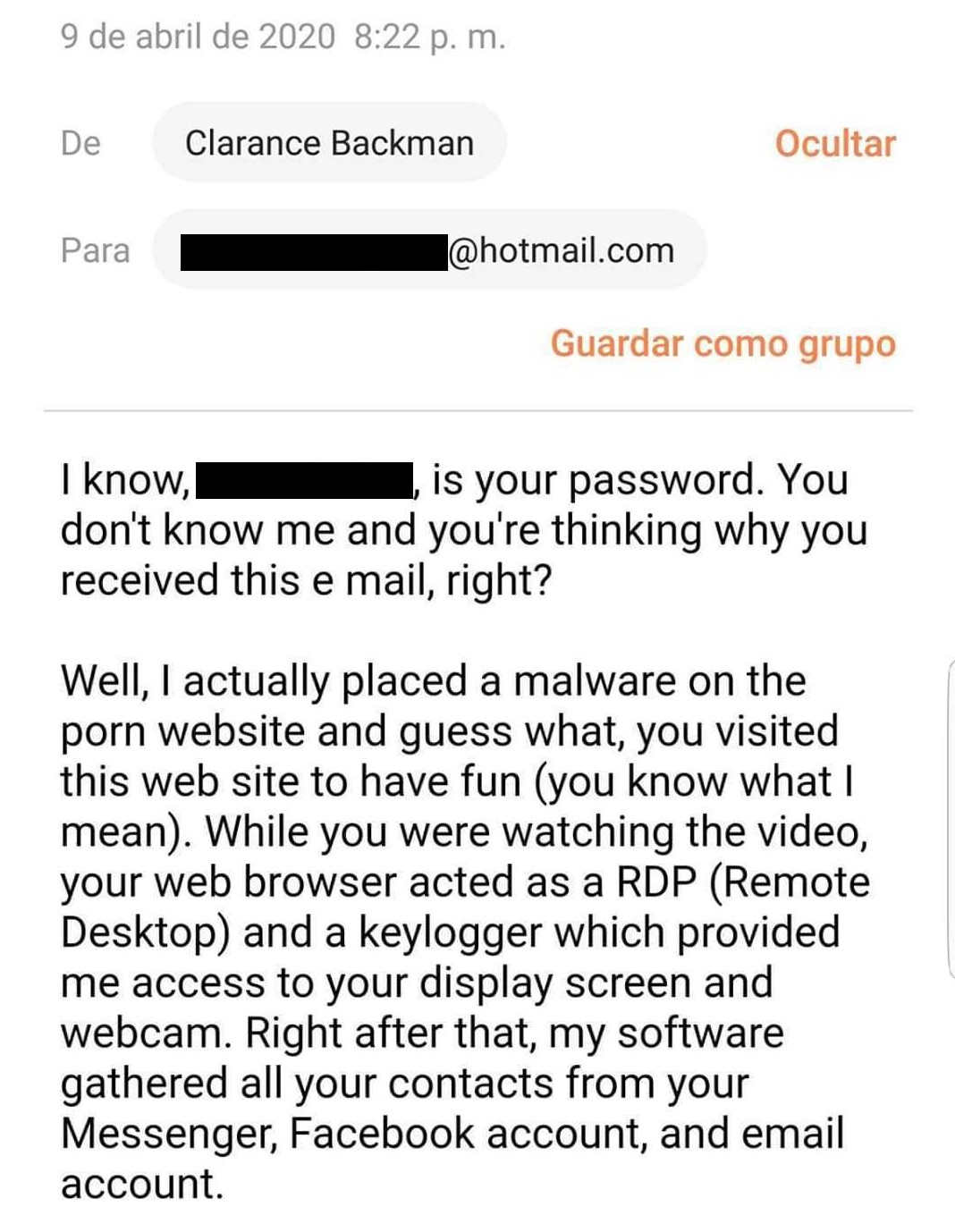
Another common ransomware scam involves the threat of revealing potentially embarrassing information, often using messages that refer to popular porn sites and claim the possession of compromising material and information. An example of a ransom note of this type appears below:
First and foremost, don’t pay any ransom. At best you will simply lose the money you pay, at worst (most hackers won’t bother to “unlock” your files — that’s just another risk for them), at worst, you will mark yourself as a candidate for further exploitation. “Scammers don’t want to risk their own exposure — they run these scams as broadly as possible and make money from those most frightened and vulnerable, then move on,” Simoni explains.
If you are locked out of your files, you may want to consult local computer service professionals. Ransom scams are very common, so they may have seen the hack you’re dealing with before, and know ways to help. If you have regularly backed up your machine, you can change hard drives on your computer and reload your files from your backup source.
But the best way to protect yourself from these scams is to have a good defense.
One of the best ways to protect your information now is to upgrade your dfndr app (if you haven’t already) to dfndr PRO. By clicking here, you will learn more, and you can use it to download PRO if you decide it’s right for you. It offers a full suite of security capabilities.
1 – Safe App Installer: Protects you from apps known to have had data breaches — before you install them.
2 – App Privacy Scan: You can locate on a map where your app data is going and how it might be used by third-parties.
3 – Unlimited Identity Theft Reports: These provide your “outer-perimeter” defense, looking out for privacy vulnerabilities beyond your own device. These reports reveal if any of your information has been leaked, with a one-click check of a database with over 4 billion compromised credentials.
4 – Anti-theft protection: Protects against physical loss that leads to data loss: in case of theft or loss of your device, you can lock it down remotely, find the phone on a map; or, activate a loud alarm to find it nearby. You can also get a picture of the thief, and wipe the phone of your personal data.
5 – Ad-Free: As an extra bonus, PRO is totally ad-free.
With dfndr PRO in your toolbox, the rest is a matter of staying as aware as you can and protecting yourself and your family. Consider adopting these rules for use of digital devices in your home:
1 – Take extra care with any link or article sent to you on social media by a friend — look closely at every link you receive before clicking!
2 – Don’t click on links sent to you via email from unknown people.
3 – Only download or install software from trusted sources. Make sure you double check URL’s!
4 – Make sure you do regular backups on your machines, and don’t pay on any ransom note sent your way to liberate your own files — or to discard compromising material.
You're shopping online, find a great deal, and notice a small padlock next to the…
Have you ever received an Android update notification and decided to install it later? In…
A cyberattack targeting Einstein Hospital Israelita, one of Brazil's leading hospitals, has raised concerns about…
AI on your phone can already generate images, summarize text, answer questions and help write…
didn't try to log in, change phones, or register your number anywhere. It is easy…
Creating AI study flashcards has become a quick way to turn class notes, summaries, and…