One of the drawbacks people perceive for having a great phone and lots of wonderful apps is the need to keep all them updated. The more apps you have, the more often you’ll receive reminders about them. Even though truth be told, most apps update pretty fast these days, it can seem like a bit of a bother.
However, there’s one great reason to always stay on top of things and update your Android apps whenever they offer one. And it may just be the best reason of all: SECURITY.
“Most apps will update for a variety of different reasons, but one of the most common reasons is security,” says Emilio Simoni, Research Director at dfndr lab. “Engineers are always testing and discovering vulnerabilities in their apps, so even if an update has no new features, for your own good, you should make it a habit to update. Or, set your device to update apps automatically.”
dfndr security’s main objective is to keep you safe. That is the reason why you should always do updates with dfndr security immediately when you receive notice of them. Our antivirus database is constantly being updated, often with the defense against the latest, most widespread threats – so if there’s ONE app you want to keep up to date, make it dfndr security.
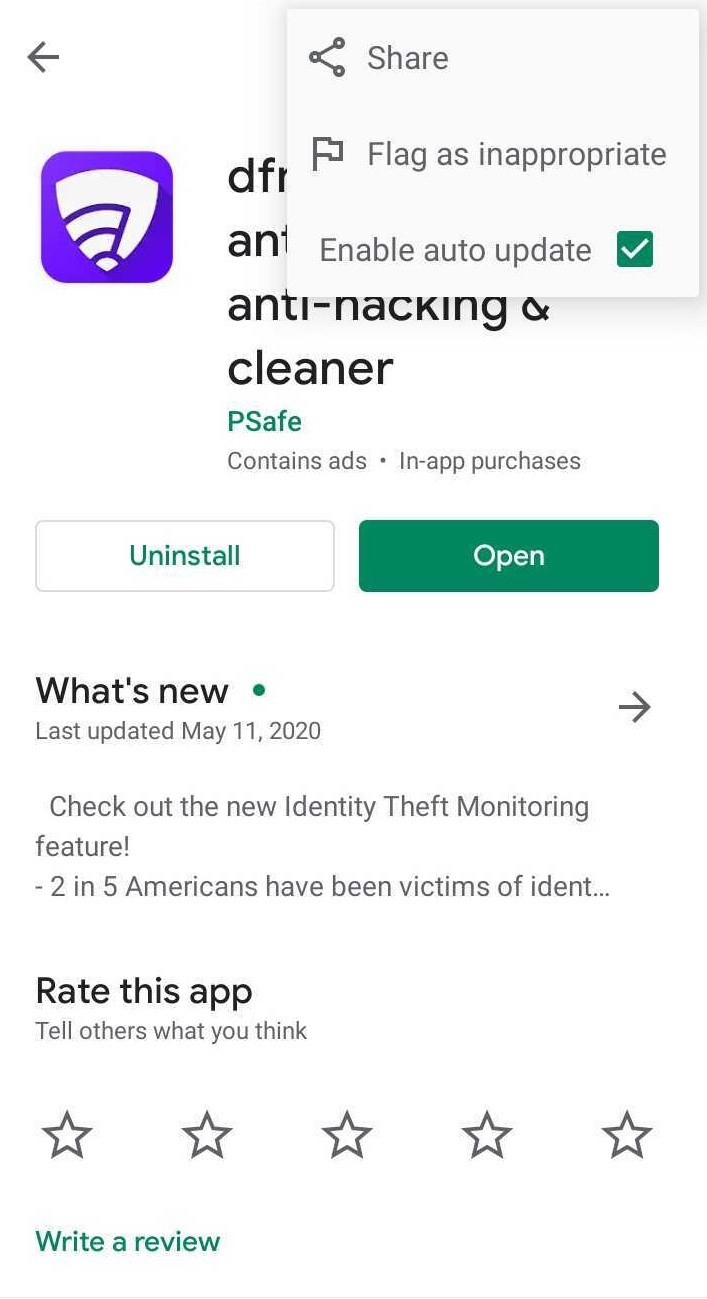
Follow the instructions from Google below to make sure your dfndr security app always updates automatically:
dfndr security will then update automatically when updates are available. To turn off automatic updates, just uncheck the box. This is what the Enable Auto Update looks like when selected:
Android lets you control automatic updating so that it always occurs only when you’re connected to WiFi. Setting to Auto Update with WiFi is a great way to make sure all your apps are always up to the second. Here’s how to make that happen:
If you need to do an emergency update and you have no WiFi you can override this setting.
“We’re seeing lots of aggressive activity among hackers since the start of the Coronavirus Pandemic,” Emilio reminds us, “If you keep your dfndr security always app up-to-date it’s going to give you the best protection we have to make sure you can use the web safely.” Simoni concludes: “And right now, with social distancing still in effect in so many places, you want to make sure your access to the web is safe and secure.”
You're shopping online, find a great deal, and notice a small padlock next to the…
Have you ever received an Android update notification and decided to install it later? In…
A cyberattack targeting Einstein Hospital Israelita, one of Brazil's leading hospitals, has raised concerns about…
AI on your phone can already generate images, summarize text, answer questions and help write…
didn't try to log in, change phones, or register your number anywhere. It is easy…
Creating AI study flashcards has become a quick way to turn class notes, summaries, and…