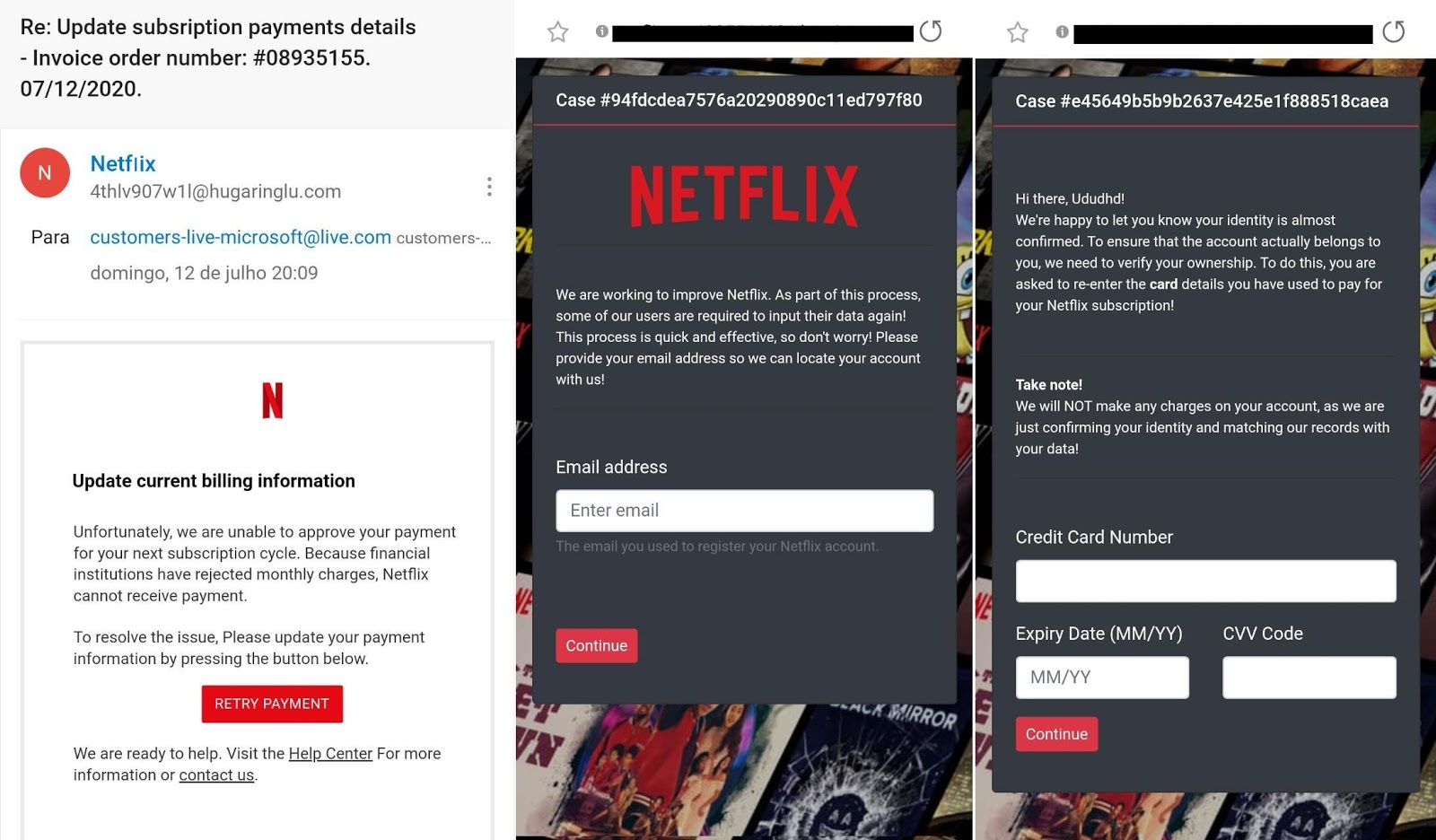
PSafe’s dfndr lab, specializing in digital security, has identified a new scheme that illegally uses Netflix’s name to steal victims’ personal information and credit card data. So far, more than 6,000 detections of this scam have been recorded.
How does this scam work?
Emilio Simoni, director of the dfndr lab, explains the scheme: “With the intention of deceiving Netflix customers, scammers steal the name and graphics of the well-known streaming platform. They approach their victims through emails with a malicious link, which directs them to a fake website posing as the official Netflix website. By clicking on this link, the victim is tricked into providing personal and credit card details for a supposed registration update. Those who provide this information hand over their sensitive data to scammers, making them likely victims of bank fraud “.
How to protect yourself from this type of digital scam:
The experts at dfndr lab list some precautions that everyone should take to avoid falling into phishing scams (malicious links):
1 – Use mobile security solutions that offer protection against digital threats. dfndr security, for example, sends security alerts in real-time to its users whenever they receive a malicious link or fake news, whether it’s on Facebook Messenger, WhatsApp, via SMS, or in the browser.
2 – Always search and check to assure you’re on the official website for every company when you receive information through the Internet. Be wary of promotions, sensational news, discounts — and any administrative action that requires you to re-furnish personal / financial information.
3 – Be careful when clicking on links shared through Facebook, TikTok, and other social networks. Also be especially wary of any unknown email contacts. Don’t provide personal information to websites unless you’re certain of their authenticity.
4 – When in doubt, it is possible to check if a link is fake on the dfndr lab website. Checking the links notifies you in a few seconds whether a website may offer any malicious features.
Imagine asking an AI assistant to organize your schedule, find an important document, or summarize…
You're shopping online, find a great deal, and notice a small padlock next to the…
Have you ever received an Android update notification and decided to install it later? In…
A cyberattack targeting Einstein Hospital Israelita, one of Brazil's leading hospitals, has raised concerns about…
AI on your phone can already generate images, summarize text, answer questions and help write…
didn't try to log in, change phones, or register your number anywhere. It is easy…