


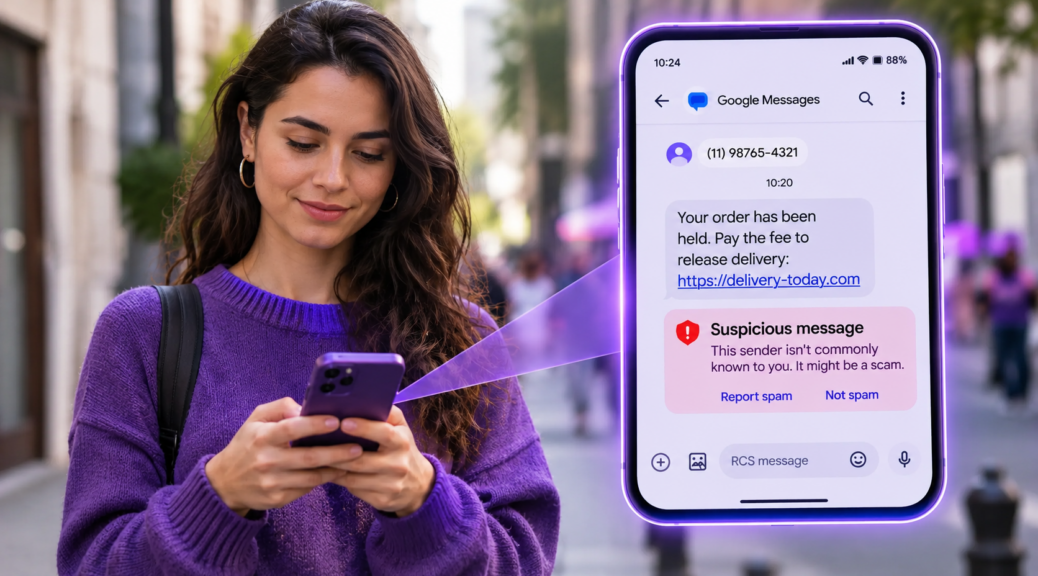
Google Messages Flagged a Text as Suspicious? Here’s What to Do
Have you ever received a text message and noticed that Google Messages flagged it as possible spam or a scam? The warning can be concerning, especially when the […]
Have you ever received a text message and noticed that Google Messages flagged it as possible spam or a scam?
The warning can be concerning, especially when the message appears to come from a bank, delivery service, retailer, or another familiar company.
Fortunately, these alerts are designed to help you recognize potentially harmful messages before taking action.
But does every warning mean the message is fraudulent? And what should you do if you receive one?
Why Does Google Messages Flag Suspicious Texts?
Google Messages includes security features that look for patterns associated with spam, phishing, and other scams.
Depending on the available protection settings, the app may analyze suspicious message patterns, check links, and warn users about potentially harmful conversations.
According to Google’s official explanation of spam and scam protection, the app uses automated detection technologies to help identify suspicious messages.
Some messages may also be filtered into the Spam & blocked folder.
However, an automated warning isn’t definitive proof of fraud.
Legitimate messages can occasionally be flagged, and some scams may avoid detection.
What Should You Do When a Warning Appears?
If Google Messages marks a text as suspicious, avoid responding immediately.
Start by reviewing the message without opening any links.
Even if the sender uses the name of a familiar company, that doesn’t guarantee the message is authentic.
Look for urgent requests, unexpected payment demands, threats of account suspension, or requests for personal information.
For example, if a message claims your bank account has been locked, open your bank’s official app instead of following the provided link.
You can also contact the company using a phone number you already know is legitimate.
Avoid using contact details included in the suspicious text.
What Types of Text Messages Are Common Scams?
Scammers often create messages designed to trigger fear, excitement, or urgency.
Common examples include:
- Delivery problems: A message claims your package is delayed and requests a small payment.
- Account warnings: The sender says your account will be suspended unless you verify your information.
- Unrecognized purchases: A text asks you to open a link to cancel a suspicious transaction.
- Unexpected prizes: The message promises a reward after you complete a form.
- Fake billing notices: A supposed service provider demands immediate payment.
The Federal Trade Commission’s guide to recognizing and reporting spam texts recommends avoiding unexpected links and contacting companies through verified channels.
How to Report a Suspicious Message
Google Messages allows users to report unwanted conversations.
To report a suspicious text:
- Open Google Messages.
- Find the conversation you want to report.
- Touch and hold the conversation.
- Select the available block or spam-reporting option.
- Confirm your choice.
Depending on your app version, you may also find reporting options inside the conversation menu.
Reporting spam may block the sender and move the conversation to the Spam & blocked folder.
Google may receive information about the reported sender and recent incoming messages to improve its detection systems.
If you recognize the sender and verify that the message is legitimate, you may be able to select Report not spam.
How to Check Your Spam Protection Settings
Open Google Messages and tap your profile picture or initial.
Find Messages settings, then look for Protection & Safety or the spam and scam protection options available on your device.
Some versions offer different protection levels.
The exact settings may vary by device, app version, and region.
Keeping the app updated helps ensure you have access to available security improvements.
However, no automated filter can identify every fraudulent message.
What if You Already Clicked the Suspicious Link?
If you opened an unfamiliar link, stop interacting with the website.
Don’t enter passwords, verification codes, payment details, or other sensitive information.
If you entered a password, change it through the official service and review your account’s multifactor authentication settings.
If you provided banking information, contact your financial institution immediately using verified contact details.
If you downloaded an unfamiliar app, review installed applications and consider seeking technical assistance.
The PSafe blog explains how to check if a link is safe and what warning signs to look for before visiting unfamiliar websites.
Simple Habits That Help Prevent Text Message Scams
Fraudulent messages can look convincing, especially when they mention familiar companies or everyday situations.
That’s why it’s important not to rely solely on a sender’s displayed name or the appearance of a message.
Verify unexpected payment requests, deliveries, and account warnings through official channels.
Avoid sharing sensitive information in response to unsolicited texts, even when the message appears urgent.
When Google Messages displays a suspicious-message warning, use it as a reminder to verify the situation before clicking, replying, or sharing personal information.
Keep reading
- Malicious Links: What They Are and How to Protect Yourself
- 5 Trending Digital Scams: How AI Is Making Fraud More Dangerous
- Could You Spot a Fake Login Page in 5 Seconds?